
My Gemini Phishing Email Analysis
Over the past couple days I noticed what I thought was a phishing email in my Inbox. So I used Gemini first in a phishing email analysis. I like using Microsoft Outlook web mail for my Office 365 account. Having been in the web business in excess of 28 years I am most confident saying it is the most secure 🔐 email to use for one’s business or personal connecting. Whether you are running a business or use email only for personal use, security is a must because our email is tied to many aspects of our lives.
When I see a phishing or otherwise bad actor originated email that perplexes me, I almost always investigate it to learn more about it. This is important to me because one of my purposes in life is to help my web clients avoid what can be difficult issues to avoid concerning their email.
My Suspicious Email Goto AIs
Gemini and ChatGPT are my favorite go to AIs when it comes to checking a suspicious email. They are both quick and easy as long as you have the header information of the email.
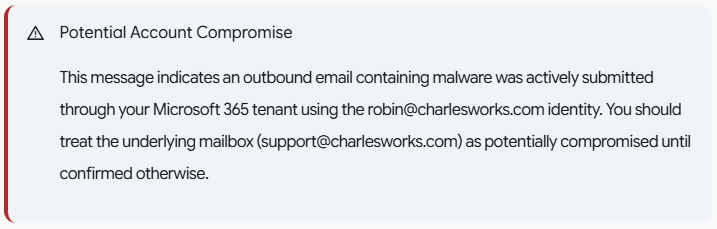
However, I was taken aback with my Gemini result. It popped up a warning as shown below – something I don’t recall it having done before. The warning warned me that my account should be treated as potentially compromised until confirmed otherwise. While I would say this is normally good advise – to always prove the account is safe when in doubt – it is an expensive and time consuming endeavor when – like most of my web clients – one has to hire a firm like ours or any IT firm to go through the necessary steps to investigate. That process involves changing all account credentials which can cause a multitude of issues depending on what you have hooked into the account.
This output from Gemini merely proved what all the AI outputs usually indicate: they can be wrong. It also points out the importance of what I choose: a second opinion. My second opinions are in the form of using one to three separate AIs to examine a problem of this nature. If they all agree, great! When two out of three agree, that’s a good indication. But if none agree, I probably an not asking the right question.
The most important thing I learned in my master’s degree studies: it’s all about knowing the right questions to ask.
Here is what I asked Gemini followed by its WRONG assessment, including the warning message before its output. My identical ask of ChatGPT follows in the next post:
I am trying to find out where this message came from and why it ends up in my Inbox. I use Outlook web mail and I believe it may be a phishing message but the option to “Report” it as either spam or phishing do not show up when I right click on it (although that option shows on other emails). It indicates it was sent by ro***@**********ks.com but there is only an alias for ro***@**********ks.com to su*****@**********ks.com and mail could not have been sent from that nonexistent address:This message was created automatically by mail delivery software. Your email message was not delivered to the intended recipients because malware was detected.— Additional Information —:Subject: -Caller left 34s September 19, 2026 – cJIBRTd8.Sender: ro***@**********ks.comTime received: 9/19/2026 4:10:15 AMMessage ID:<[1789791014415.e37452553538c5d1-JFZGS42DN5WW25LONFRWC5DJN5XFA3DBORTG64TNFVIHE33EFVGVOMKQPREUCTKTKNIFE7CTKNIFERLNMFUWY7CFPBXVG3LUOA======@charlesworks.com]>Detections found:Vrecording_Erecorded_ATT61.svg.. Script/SvgStealer.ADX!MTBThe “view Massage” option in my Outlook web mail shows me this:Received: from PH8PR11MB7024.namprd11.prod.outlook.com (2603:10b6:510:220::19)by SAVPR11MB9574.namprd11.prod.outlook.com with HTTPS; Sat, 19 Sep 202604:10:18 +0000Received: from SmtpServer.Submit by PH8PR11MB7024 with Microsoft SMTP Serverid 15.21.406.11; Sat, 19 Sep 2026 04:10:18 +0000MIME-Version: 1.0Content-Type: text/plain; charset=”utf-8″From: Postmaster <po********@**********ks.com>Subject: Undeliverable messageContent-Transfer-Encoding: quoted-printableTo: <su*****@**********ks.com>Message-ID:<7f**********************************@*********************************ok.com>Return-Path: po********@**********ks.comDate: Sat, 19 Sep 2026 04:10:18 +0000X-MS-Exchange-Organization-ExpirationStartTime: 19 Sep 2026 04:10:18.2837(UTC)X-MS-Exchange-Organization-ExpirationStartTimeReason: OriginalSubmitX-MS-Exchange-Organization-ExpirationInterval: 1:00:00:00.0000000X-MS-Exchange-Organization-ExpirationIntervalReason: OriginalSubmitX-MS-Exchange-Organization-Network-Message-Id:29b93226-d43b-478f-fcd1-08df1603ea60X-MS-Exchange-Organization-AuthSource: PH8PR11MB7024.namprd11.prod.outlook.comX-MS-Exchange-Organization-AuthAs: InternalX-MS-Exchange-Organization-AuthMechanism: 05X-MS-Exchange-Parent-Message-Id:<[1789791014415.e37452553538c5d1-JFZGS42DN5WW25LONFRWC5DJN5XFA3DBORTG64TNFVIHE33EFVGVOMKQPREUCTKTKNIFE7CTKNIFERLNMFUWY7CFPBXVG3LUOA======@charlesworks.com]>Auto-Submitted: auto-generatedX-MS-Exchange-Generated-Message-Source: DC Post Content Filter AgentX-MS-PublicTrafficType: EmailX-MS-TrafficTypeDiagnostic: PH8PR11MB7024:EE_|SAVPR11MB9574:EE_X-MS-Exchange-Organization-SCL: 1X-Microsoft-Antispam:BCL:0;ARA:13230040|1930700014|366016|56012099006|12063799003|10067099003|18002099003|41050700001;X-Forefront-Antispam-Report:CIP:255.255.255.255;CTRY:;LANG:en;SCL:1;SRV:;IPV:NLI;SFV:NSPM;H:;PTR:;CAT:NONE;SFS:(13230040)(1930700014)(366016)(56012099006)(12063799003)(10067099003)(18002099003)(41050700001);DIR:INT;X-MS-Exchange-CrossTenant-OriginalArrivalTime: 19 Sep 2026 04:10:18.2834 (UTC)X-MS-Exchange-CrossTenant-Network-Message-Id:29b93226-d43b-478f-fcd1-08df1603ea60X-MS-Exchange-CrossTenant-AuthSource: PH8PR11MB7024.namprd11.prod.outlook.comX-MS-Exchange-CrossTenant-AuthAs: InternalX-MS-Exchange-CrossTenant-FromEntityHeader: HostedX-MS-Exchange-Transport-CrossTenantHeadersStamped: PH8PR11MB7024X-MS-Exchange-Organization-MessageDirectionality: OriginatingX-MS-Exchange-Transport-EndToEndLatency: 00:00:00.6486099X-MS-Exchange-Processed-By-BccFoldering: 15.21.0428.008X-MS-Exchange-ExternalInOutlookResult: NotEnabledX-Microsoft-Antispam-Mailbox-Delivery:ucf:0;jmr:0;auth:0;dest:I;ENG:(910005)(944506478)(944626604)(920097)(425001)(930201)(20251009189)(140003);X-Microsoft-Antispam-Message-Info:xuNr8XT2UiI8kmeQ7vTwjjloBhzPu/NOSnDZ8nYwnyjaERxMG5YzKr35E2fY/Ja+bMQAd9LPy0fbIn9ejg8cTQVMmPfNLeEQ2Krgx1F6DxdeAufyJfN0jjFjkgr4eUrr2/bahM6aMBHXalIKcAy0HqlN100CggPEgGABIWOyuhttlvvX/Tdl0OViDHgOtPw9lCUi1vx3u/zwNovLrZltOsoVBKT/yggFMCquH/6gm1d95gnQwZhhRUYH/lVN/UZfdx1XLWUt3eaO5VMl0CHnw/MKpu8dDHsYtn9u89Q1Zk8lS0MPCxKuuvBkGfobsYvR+kOsCf7+Arz/ltMO99w5DuocxkuDLLFNO4DfSWRkw+Ovm2XBelFakkrv0WHSK4q+08Allgeox1hWGEIeknDBwIWj0t6JkmiqIW3FWVhFzFqArsBfbqZaxGWo3PZOFgTBpRoALq3aJ86kISw1OZVs9IBDZYht0367UoWe0GImW808FeuiC1efb1Emfx686OW0NddoP36TMqjiEaOBKCrkSklyc1Gk7wEPX1vDGA+u0tCkEnOl3Pj/aqaQqXwirS9F0ZTRdRwUxpS6SR0fb3IRUdcGG++r8+BxYwHa1vOSlSC8u8/Gy1ZJIK/fxdcp2A35orzJRsFY4ftB+TK5nYos5allhlQdZEzdYMeD/nbof0pj81gJ/Z1dCCgVXF8NicNIJAlgFMbkCDqPRay9qsAhg4zM/bXaghQAqwCw1PpGHnOn0oetsOiyqpNJpj9SVGvSIRJT2T6bVN0m/pjRXFujF8cwU+AZq6wPtCxvdRodrAX63c4ZUjcykjCZmsC9I7fL
 Why You See This and Why “Report” Is Missing
-
Why the “Report” button is missing:This email is an authentic, system-generated Non-Delivery Report (NDR) from your own Microsoft 365 tenant (
From: Postmaster <po********@**********ks.com>). The headers containX-MS-Exchange-Organization-AuthAs: InternalandAuto-Submitted: auto-generated. Outlook intentionally disables the “Report Phishing” or “Report Junk” options on internal system messages from your own postmaster. -
Where the message came from:The NDR was generated by Microsoft’s filter (
DC Post Content Filter Agent). The filter intercepted an outbound message carrying a malicious SVG payload (Script/SvgStealer.ADX!MTBdisguised as a voicemail file), blocked delivery to the external recipient, and generated a bounce back to the sender. -
Why it landed in your Inbox:Because the NDR is an authentic system communication from
postmaster@, it received an internal Spam Confidence Level ofSCL: 1(SFV: NSPM— non-spam) and was delivered straight to the Inbox (dest: I). -
How mail was sent from an alias:Exchange Online supports “Send as Alias.” If someone obtains access to
su*****@**********ks.com—via compromised credentials, session hijacking, or basic SMTP submission—they can authenticate as the primary account and send mail appearing from any configured alias (ro***@**********ks.com). It could also originate from an internal relay connector if IP authentication is loosely scoped.