My ChatGPT Phishing Email Analysis
As I had mentioned in the last post, I noticed what I thought was a phishing email in my Inbox. This time, I did a ChatGPT phishing email analysis.
I always share that I like using Microsoft Outlook web mail for my Office 365 account. Having been in the web business in excess of 28 years I am most confident saying it is the most secure 🔐 email to use for one’s business or personal connecting. Whether you are running a business or use email only for personal use, security is a must because our email is tied to many aspects of our lives.
When I see a phishing or otherwise bad actor originated email that perplexes me, I investigate it to learn more about it. This is important to me because one of my purposes in life is to help my web clients avoid what can be difficult issues to avoid concerning their email.
Gemini Result Was Just Way Off Base
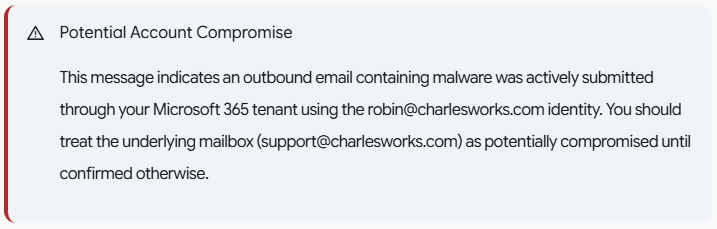
I was taken aback with my Gemini result posted in the last post. It warned me that my account should be treated as potentially compromised until confirmed otherwise. Again, I would say this is normally good advise – to always prove the account is safe when in doubt. However, it is an expensive endeavor when – like most of my web clients – one has to hire a firm like ours or an IT firm to go through the necessary steps to investigate.
The output from Gemini proved what all the AI outputs usually indicate: that they can be wrong. Gemini’s outlput also pointed out the importance of what I would choose: a second opinion. My second opinions usually come in the form of using one or more separate AIs to examine a problem of this nature. If they all agree, great! When two out of three agree, that’s still a good indication. But if none agreed, I’m probably not asking the right question.
The most important thing I learned in my master’s degree studies: it’s all about knowing the right questions to ask.
Here is exactly what I asked ChatGPT followed by its confirmed correct assessment and followup info I provided it. Note that ChatGPT asked for more information based in its suspicions. My experience in these matters verifies its behavior based on what I would have done:
I am trying to find out where this message came from and why it ends up in my Inbox. I use Outlook web mail and I believe it may be a phishing message but the option to “Report” it as either spam or phishing do not show up when I right click on it (although that option shows on other emails). It indicates it was sent by ro***@**********ks.com but there is only an alias for ro***@**********ks.com to su*****@**********ks.com and mail could not have been sent from that nonexistent address:This message was created automatically by mail delivery software. Your email message was not delivered to the intended recipients because malware was detected.— Additional Information —:Subject: -Caller left 34s September 19, 2026 – cJIBRTd8.Sender: ro***@**********ks.comTime received: 9/19/2026 4:10:15 AMMessage ID:<[1789791014415.e37452553538c5d1-JFZGS42DN5WW25LONFRWC5DJN5XFA3DBORTG64TNFVIHE33EFVGVOMKQPREUCTKTKNIFE7CTKNIFERLNMFUWY7CFPBXVG3LUOA======@charlesworks.com]>Detections found:Vrecording_Erecorded_ATT61.svg.. Script/SvgStealer.ADX!MTBThe “view Massage” option in my Outlook web mail shows me this:Received: from PH8PR11MB7024.namprd11.prod.outlook.com (2603:10b6:510:220::19)by SAVPR11MB9574.namprd11.prod.outlook.com with HTTPS; Sat, 19 Sep 202604:10:18 +0000Received: from SmtpServer.Submit by PH8PR11MB7024 with Microsoft SMTP Serverid 15.21.406.11; Sat, 19 Sep 2026 04:10:18 +0000MIME-Version: 1.0Content-Type: text/plain; charset=”utf-8″From: Postmaster <po********@**********ks.com>Subject: Undeliverable messageContent-Transfer-Encoding: quoted-printableTo: <su*****@**********ks.com>Message-ID:<7f**********************************@*********************************ok.com>Return-Path: po********@**********ks.comDate: Sat, 19 Sep 2026 04:10:18 +0000X-MS-Exchange-Organization-ExpirationStartTime: 19 Sep 2026 04:10:18.2837(UTC)X-MS-Exchange-Organization-ExpirationStartTimeReason: OriginalSubmitX-MS-Exchange-Organization-ExpirationInterval: 1:00:00:00.0000000X-MS-Exchange-Organization-ExpirationIntervalReason: OriginalSubmitX-MS-Exchange-Organization-Network-Message-Id:29b93226-d43b-478f-fcd1-08df1603ea60X-MS-Exchange-Organization-AuthSource: PH8PR11MB7024.namprd11.prod.outlook.comX-MS-Exchange-Organization-AuthAs: InternalX-MS-Exchange-Organization-AuthMechanism: 05X-MS-Exchange-Parent-Message-Id:<[1789791014415.e37452553538c5d1-JFZGS42DN5WW25LONFRWC5DJN5XFA3DBORTG64TNFVIHE33EFVGVOMKQPREUCTKTKNIFE7CTKNIFERLNMFUWY7CFPBXVG3LUOA======@charlesworks.com]>Auto-Submitted: auto-generatedX-MS-Exchange-Generated-Message-Source: DC Post Content Filter AgentX-MS-PublicTrafficType: EmailX-MS-TrafficTypeDiagnostic: PH8PR11MB7024:EE_|SAVPR11MB9574:EE_X-MS-Exchange-Organization-SCL: 1X-Microsoft-Antispam:BCL:0;ARA:13230040|1930700014|366016|56012099006|12063799003|10067099003|18002099003|41050700001;X-Forefront-Antispam-Report:CIP:255.255.255.255;CTRY:;LANG:en;SCL:1;SRV:;IPV:NLI;SFV:NSPM;H:;PTR:;CAT:NONE;SFS:(13230040)(1930700014)(366016)(56012099006)(12063799003)(10067099003)(18002099003)(41050700001);DIR:INT;X-MS-Exchange-CrossTenant-OriginalArrivalTime: 19 Sep 2026 04:10:18.2834 (UTC)X-MS-Exchange-CrossTenant-Network-Message-Id:29b93226-d43b-478f-fcd1-08df1603ea60X-MS-Exchange-CrossTenant-AuthSource: PH8PR11MB7024.namprd11.prod.outlook.comX-MS-Exchange-CrossTenant-AuthAs: InternalX-MS-Exchange-CrossTenant-FromEntityHeader: HostedX-MS-Exchange-Transport-CrossTenantHeadersStamped: PH8PR11MB7024X-MS-Exchange-Organization-MessageDirectionality: OriginatingX-MS-Exchange-Transport-EndToEndLatency: 00:00:00.6486099X-MS-Exchange-Processed-By-BccFoldering: 15.21.0428.008X-MS-Exchange-ExternalInOutlookResult: NotEnabledX-Microsoft-Antispam-Mailbox-Delivery:ucf:0;jmr:0;auth:0;dest:I;ENG:(910005)(944506478)(944626604)(920097)(425001)(930201)(20251009189)(140003);X-Microsoft-Antispam-Message-Info:xuNr8XT2UiI8kmeQ7vTwjjloBhzPu/NOSnDZ8nYwnyjaERxMG5YzKr35E2fY/Ja+bMQAd9LPy0fbIn9ejg8cTQVMmPfNLeEQ2Krgx1F6DxdeAufyJfN0jjFjkgr4eUrr2/bahM6aMBHXalIKcAy0HqlN100CggPEgGABIWOyuhttlvvX/Tdl0OViDHgOtPw9lCUi1vx3u/zwNovLrZltOsoVBKT/yggFMCquH/6gm1d95gnQwZhhRUYH/lVN/UZfdx1XLWUt3eaO5VMl0CHnw/MKpu8dDHsYtn9u89Q1Zk8lS0MPCxKuuvBkGfobsYvR+kOsCf7+Arz/ltMO99w5DuocxkuDLLFNO4DfSWRkw+Ovm2XBelFakkrv0WHSK4q+08Allgeox1hWGEIeknDBwIWj0t6JkmiqIW3FWVhFzFqArsBfbqZaxGWo3PZOFgTBpRoALq3aJ86kISw1OZVs9IBDZYht0367UoWe0GImW808FeuiC1efb1Emfx686OW0NddoP36TMqjiEaOBKCrkSklyc1Gk7wEPX1vDGA+u0tCkEnOl3Pj/aqaQqXwirS9F0ZTRdRwUxpS6SR0fb3IRUdcGG++r8+BxYwHa1vOSlSC8u8/Gy1ZJIK/fxdcp2A35orzJRsFY4ftB+TK5nYos5allhlQdZEzdYMeD/nbof0pj81gJ/Z1dCCgVXF8NicNIJAlgFMbkCDqPRay9qsAhg4zM/bXaghQAqwCw1PpGHnOn0oetsOiyqpNJpj9SVGvSIRJT2T6bVN0m/pjRXFujF8cwU+AZq6wPtCxvdRodrAX63c4ZUjcykjCZmsC9I7fL
 What you are seeing is not the original malicious message. It is a Microsoft Exchange Online-generated delivery failure notice created after Microsoft detected malware in another message.
Several headers make that clear:
From: Postmaster <po********@**********ks.com>X-MS-Exchange-Organization-AuthAs: InternalX-MS-Exchange-Organization-MessageDirectionality: OriginatingX-MS-Exchange-Generated-Message-Source: DC Post Content Filter AgentAuto-Submitted: auto-generated
So the message sitting in your Inbox was generated inside Microsoft’s mail system. That also explains the odd behavior you’re seeing in Outlook.
Why “Report phishing” is missing
Microsoft considers this particular message an internal system-generated notification, not an Internet email.
These headers reinforce that:
X-MS-Exchange-Organization-SCL: 1
SFV:NSPM
DIR:INT
SCL: 1 is a very low spam score, NSPM means Microsoft’s filter classified it as not spam, and DIR:INT identifies the delivery as internal.
Consequently, Outlook apparently isn’t offering you the normal Report → Junk / Phishing choices. There really isn’t much point in reporting this particular message anyway—the malicious message was the parent message, and Microsoft already caught it.
The interesting part is ro***@**********ks.com
The important distinction is this:
An email absolutely can claim to be from ro***@**********ks.com even though no mailbox named Robin exists.
SMTP does not require the address in the sender field to correspond to a real mailbox. A spammer can send something like:
MAIL FROM:<ro***@**********ks.com>
From: ro***@**********ks.com
from a server anywhere in the world.
The fact that ro***@**********ks.com is an alias of su*****@**********ks.com explains very nicely why the resulting failure notice wound up with:
To: <su*****@**********ks.com>Microsoft attempted to return the failure notice to the purported sender, ro***@**********ks.com. Since Microsoft 365 knows that address belongs to the support mailbox, the notification wound up in support’s Inbox.
In other words, this has all the hallmarks of backscatter caused by a spoofed sender address.
The SVG malware is another big clue
The blocked parent message had:
Subject: -Caller left 34s September 19, 2026 - cJIBRTd8.and Microsoft found:
Vrecording_Erecorded_ATT61.svg
Script/SvgStealer.ADX!MTB
That looks very much like the current style of fake voicemail/call recording phishing lure. The .svg attachment contained scripting Microsoft classified as credential-stealing malware.
So I would not open or attempt to recover that attachment.
But we can determine where the original message really came from
The NDR fortunately gives us the original message ID:
<[1789791014415.e37452553538c5d1-JFZGS42DN5WW25LONFRWC5DJN5XFA3DBORTG64TNFVIHE33EFVGVOMKQPREUCTKTKNIFE7CTKNIFERLNMFUWY7CFPBXVG3LUOA======@charlesworks.com]>It appears again here:
X-MS-Exchange-Parent-Message-Id:That gives us something very useful to hunt down in your Microsoft 365 message trace.
Go to:
https://admin.exchange.microsoft.com/
Then go to Mail flow → Message trace.
I’d search a window around:
September 19, 2026, 04:10 UTC
which is September 19, 2026, 12:10 AM Eastern Daylight Time.
First try:
Sender:
ro***@**********ks.com
and leave the recipient unrestricted if Exchange lets you.
I’d use perhaps 04:00 through 04:20 UTC to keep the results small.
What we want to see
If the trace shows something equivalent to an incoming Internet message with a remote sending IP, then we’ve nailed it:
Someone on the Internet spoofed
ro***@**********ks.com, Microsoft detected malware, generated an NDR to the spoofed sender, and because Robin is an alias of Support, you received the NDR.
That is what I presently think happened.
However, if the trace shows that the parent message was submitted/authenticated within your Microsoft 365 organization, that becomes much more interesting. Then we would want to determine whether it came from:
- the
supportmailbox using the Robin alias, - an authenticated SMTP client,
- a Microsoft 365 account,
- an application,
- a connector,
- or another authorized sending mechanism.
I do not see evidence in the headers you’ve provided that the Robin account was compromised. In fact, since Robin isn’t an account, that particular scenario makes little sense. The AuthAs: Internal header applies to the NDR you’re reading, not necessarily to the malicious parent message. That’s an important distinction.
So my working theory is:
Internet attacker → spoofed ro***@**********ks.com → malicious fake voicemail message → Microsoft malware filter catches it → Microsoft sends failure notice back to Robin → Robin alias resolves to Support → NDR lands in your Inbox.
If you give me the message trace details for the parent message, we should be able to prove or disprove that theory and, hopefully, identify the actual sending IP.
Received: from BN9PR03CA0851.namprd03.prod.outlook.com (2603:10b6:408:13d::16)
by PH8PR11MB7024.namprd11.prod.outlook.com (2603:10b6:510:220::19) with
Microsoft SMTP Server (version=TLS1_2,
cipher=TLS_ECDHE_RSA_WITH_AES_256_GCM_SHA384) id 15.21.406.11; Sat, 19 Sep
2026 04:10:15 +0000
Received: from BN2PEPF0000A894.namprd04.prod.outlook.com
(2603:10b6:408:13d:cafe::20) by BN9PR03CA0851.outlook.office365.com
(2603:10b6:408:13d::16) with Microsoft SMTP Server (version=TLS1_3,
cipher=TLS_AES_256_GCM_SHA384) id 15.21.428.13 via Frontend Transport; Sat,
19 Sep 2026 04:10:15 +0000
Authentication-Results: spf=none (sender IP is 192.3.183.94)
smtp.helo=mta-80-125.sparkpostmail.com; dkim=none (message not signed)
header.d=none;dmarc=fail action=quarantine
header.from=charlesworks.com;compauth=fail reason=000
Received-SPF: None (protection.outlook.com: mta-80-125.sparkpostmail.com does
not designate permitted sender hosts)
Received: from mta-80-125.sparkpostmail.com (192.3.183.94) by
BN2PEPF0000A894.mail.protection.outlook.com (10.167.248.186) with Microsoft
SMTP Server (version=TLS1_3, cipher=TLS_AES_256_GCM_SHA384) id 15.21.451.8
via Frontend Transport; Sat, 19 Sep 2026 04:10:15 +0000
Return-Path: <>
From: ro***@**********ks.com
To: Robin <ro***@**********ks.com>
Subject: -Caller left 34s September 19, 2026 – cJIBRTd8.
Message-ID: <[1789791014415.e37452553538c5d1-JFZGS42DN5WW25LONFRWC5DJN5XFA3DBORTG64TNFVIHE33EFVGVOMKQPREUCTKTKNIFE7CTKNIFERLNMFUWY7CFPBXVG3LUOA======@charlesworks.com]>
Date: Sat, 19 Sep 2026 04:10:14 +0000
MIME-Version: 1.0
Content-Type: text/plain
X-EOPAttributedMessage: 0
X-EOPTenantAttributedMessage: 87733afe-0d9d-4701-bcd1-865bd5674a0b:0
X-MS-PublicTrafficType: Email
X-MS-TrafficTypeDiagnostic: BN2PEPF0000A894:EE_
PH8PR11MB7024:EE_
X-MS-Office365-Filtering-Correlation-Id: de0283ca-ed7e-4553-f9b1-08df1603e88e
X-MS-Exchange-AtpMessageProperties: SA
SL
X-Forefront-Antispam-Report: CIP:192.3.183.94;CTRY:US;LANG:en;SCL:9;SRV:;IPV:NLI;SFV:SPM;H:mta-80-125.sparkpostmail.com;PTR:192-3-183-94-host.colocrossing.com;CAT:AMP;SFS:(13230040)(5009299003)(6049299003)(29132699027)(260918215300599003)(260918224100599003)(5063699009)(10067099003)(18002099003)(55112099003)(19002099009)(4053099003)(57112099003);DIR:INB;
X-Microsoft-Antispam: BCL:0;ARA:13230040
5009299003
6049299003
29132699027
260918215300599003
260918224100599003
5063699009
10067099003
18002099003
55112099003
19002099009
4053099003
57112099003;
X-Microsoft-Antispam-Message-Info: =?us-ascii?Q?6hEd90HgmiMpox31IEQxVxzcBToOab3qD3knO+p3n5bIHQyfxQ9uiHWVCRl2?=
=?us-ascii?Q?gq2BEwBVxpEF1SFdx5uujuYSw1aqU14WB2OgQnVz6hHBW+ZB6/tEUyTAvOAj?=
=?us-ascii?Q?ctZmS9QioFJ/dqnLulvOdr6cx7D+ub7MOzgX+TD3vc/n/xgjMdqMdkl8UTWC?=
=?us-ascii?Q?WI5XYa9Ec9+9ybXxz1lKFBqbF9ETYtj7jAYgbwxQet6DUoqOv1gn6/azfF+U?=
=?us-ascii?Q?sGv198ljoKLBMQEZsK1aPgAMKC/k5TbmPjSav9pLar1ulwnMKkcq/P75HiO2?=
=?us-ascii?Q?mMIFPBJ71LWAdHE2vAnrWuH2tP9JmpOwSM3/TRzprcEJJA6py8JK+eHF5mPX?=
=?us-ascii?Q?83JTV2+jTBcKsQURERAZdonS8izIBAfTQ930VKQFylFeF46EMlEzsdn4GoZN?=
=?us-ascii?Q?8lv9KjRT8tAvEhsC8wYEDTXRhIhenEqK8e+m52PlV2jWyT8deEcCAtUNc0lB?=
=?us-ascii?Q?KT0S85AgvGAdMJPTdMMmQrkElN/6faU68PbTr/pUjVurxn9Flgiy0AqsIwsN?=
=?us-ascii?Q?HhnuHJXljMc0CnFtnzc0fziXucrdVH2mgoI0+Ug++UL0lZHxMeMPoe97TaWi?=
=?us-ascii?Q?W+F86blHHdZmG/oIDvhVNNbTFpceeuUaZ0YUUWOuKCsgwCWE4CA4v7Wkc6R2?=
=?us-ascii?Q?k7Mf6DZX1dg1RZa99RPb7THWob4Opc+uQQw2rxgrA6Ud1LfKFvyIlk5A4O6Z?=
=?us-ascii?Q?oJBTbEVcsKgjPHNwe18ssQ6O2Ol+KKEB1KT5oCFdmN2Z3b/0w+2VFI2O1z4N?=
=?us-ascii?Q?Sgr/4oF4vh/ERn073CGS8jyzUprS1eE+NtDaanx3tznTA37163ZqEzudtb9d?=
=?us-ascii?Q?Ual9i88maSy0JY91Nq4m/jTnvn1Kkyn+RCxRSfJhcRIqVSFX5Nm5o9u4HXNq?=
=?us-ascii?Q?cP05yaUaI0gO8K84pjjF7egluzXz1JCC1QsPswmJX72RP3pH8CLbblHhP+/n?=
=?us-ascii?Q?xYVKhgQmPO/eiHL1UNr9bgiSsiuADME9YHhoy6ZB8MLrZcXTP60TfNmVDZmo?=
=?us-ascii?Q?l0A6J96y+ZTzk5AqJFfGkjYdhUXENPYKAg/SHJmAddtjpZDViWYx0IHls0sR?=
=?us-ascii?Q?eJzoSIvlaZY56vpR+g3lQFYngSFj5hGxQsuLXysbPv2/FqBHuSyEL5OVAkOj?=
=?us-ascii?Q?2OofuOk3tiTXDIxFoNroW9t4IYUNCsfDTkTZxbVWlR0XTk5LJ2t9ZpXgOr1g?=
=?us-ascii?Q?8o9gIZrPavC8bKNwVBJnsGM+FGEKV4OZkAFMzppE/Z0/Umx4gEImb9YGLb9M?=
=?us-ascii?Q?GnPoOJS7WDorecCX8qw2I8TI086Hn+poi6X4JyRvkyqEifb0tB3s33QghwrH?=
=?us-ascii?Q?mge2524Lx4RzDPLl1frWq1hGZl5ll0X+TsgN7n6kmLgXAnSpJxkIHM0RKk+1?=
=?us-ascii?Q?Cqj/4ycJoHCG/RgugkM8YBS0WH/OUlKjtwuI800e1N6MxmkM2skPqzLq1Knh?=
=?us-ascii?Q?ubFxcE8cu2DZsNU7MbdqRDJRUenCn5VunfoPrl/wEsPE05i/LC0KXBlsmfhL?=
=?us-ascii?Q?jVZ9p4IimaP992ComQKeIPJhge5T8kInCKF6yMz0bFD28w7GalqDxEhtIfd1?=
=?us-ascii?Q?p7HMsPq66nJ66nnfgZ5RqWITjJzgu9PJid/MgwZ9uDDWgV8wNeDRuqNc8Hhh?=
=?us-ascii?Q?+S2fq8D/bJXhEB3Dg/EeOnCor9yHWePnfQG8xoVoVEsgtbldqqhOKlWufygX?=
=?us-ascii?Q?rHSQFtyIJQjDWXon/eHbvU4Idrm5sQzUuZQfmD184HdI+SLowM2bf84omXt0?=
=?us-ascii?Q?przsy2LAIyQu096JAYs6rM0MSXKGGXi6W4g00+DmsHdQ5E+ni0aC7jnYSX2O?=
=?us-ascii?Q?lJ+gBBbokqdlOz0UOu3pY2GxA6icRLYkY/rln8ITagHemAGOMgq/8byYcluj?=
=?us-ascii?Q?UFgaittHWJGhPbNF3iVcztwAVytozBswA5FIzwt/2UJiOoFj0ai6YE9ipMjR?=
=?us-ascii?Q?9Y8zGQRB2l3jMYHiFdT1cCiG/TlGirNQmAJsWg037Kh1ui0VQ6tu1Y2fZjQF?=
=?us-ascii?Q?JHjMpzBJCCA4O9zc9oviFrUEiDR29j74DPrhQivj5VjQvI1ctXl8P02T71CI?=
=?us-ascii?Q?aQ8XV0lUHdTwD28moXEOLPV3I1u4Tk3F5zHZ3GK+mje1c5gbkObTFQtlbUkA?=
=?us-ascii?Q?RdfPN2GfpJm75gJoIJVkgsUgvDsHOl0jSN/eo7F7b0Rr3e/PlVvxdLCgBh5M?=
=?us-ascii?Q?I9P9B8a5nzDcNoy6XbRKvQO0a8KKOqHnG+rBBuUy0Kpx+I8Y02BJabtaSbXa?=
=?us-ascii?Q?i1Kr8qHKMAJgNRVpOVKqK8Q4WxuPXr160g3kabt6o8jLQ1T5t7sn6WwyrLov?=
=?us-ascii?Q?hAW8aKfdABmRoBBH8KKB1JwdpKsQNO2DhxGJfDnfAuu2llp5VCMsthsQN/pW?=
=?us-ascii?Q?xtcOOeEo3rhoEm8RA7EzJxb3z9oeu9r3neXWFaOiocMcFRM6AdhwanetLJk+?=
=?us-ascii?Q?3xrcVfcuDhesBSRZDeE/pS/ngjvJHKlko/Ck2x3rxpAP6L6v6T++/5DsUBU4?=
=?us-ascii?Q?fDmZ3zSu0mWOP1aet12G6EPzqFv9wKjC2zv1FYGUHfqZht8+DC8icsaqa1xa?=
=?us-ascii?Q?y4zVW12aZs/GyHP5M6WD7oOQfqzLv24+4yJsvHV8+hZ27V5y9uqrcBHvEAA/?=
=?us-ascii?Q?ZmHS0ALpVPEIhP+8yQRakhTxhkA01Di9ARBIiGvEj2Yj2K2BZTjp0HkIbhJJ?=
=?us-ascii?Q?uvAZhhPVlarQIIdJSnrL2q83+bBPnmCB1gbrOkos0T06Lpb99t9QEWNvA7EV?=
=?us-ascii?Q?4kWt4cbqW4GW6iRIQ+GES55392EqFA3EqP7TU87osxGD6h2d4OLawyyhW+d0?=
=?us-ascii?Q?/w1Y0ih4dsXU9fwv/36ny3aDOKbUUdUbx1v9FzS+T5QPdM6E6k8Xin8YlAss?=
=?us-ascii?Q?U6BQMgbc0VVaHcITcBDpMjMqj62sfIoaSTVgMYnGqBmikL1NjjyaKXhlTolT?=
=?us-ascii?Q?i3N9OSFXLdkJqfz+0PRGYCnGnmYhIE5mot59tZKpYFYV07EqiVPiysz1XPSs?=
=?us-ascii?Q?2bB+llvUIXF9Y3ZixNAMsn8h/2ysR3OGtv4kom0f6jAOFYrB2iydtQRstvRA?=
=?us-ascii?Q?A/bxa2BRSr1/CQqk1jK+DLb0ibBreZYn2fC+gZpUqTqRZtQC3a6KGeVq58JS?=
=?us-ascii?Q?NRF7DFUaE7QGFBamrnsbGIFFWlV/cj4UIm7LY5LPnDgdKlSPkHPjDZ/mx83b?=
=?us-ascii?Q?ZlrZr+vxULHgV47zQnLN/T1y6IbAoHfmVnwtZA=3D=3D?=
Yes. This second set of headers proves it.
The message was spoofed, and it did not originate from ro***@**********ks.com, Outlook, Microsoft 365, or any CharlesWorks mail server.
The actual Internet host that connected to Microsoft was:
192.3.183.94at 04:10:15 UTC on September 19, 2026.
The smoking-gun line is:
Received: from mta-80-125.sparkpostmail.com (192.3.183.94)
by BN2PEPF0000A894.mail.protection.outlook.comBut even the mta-80-125.sparkpostmail.com name is misleading. That’s the hostname the connecting SMTP server announced in its HELO/EHLO. The reverse DNS Microsoft actually found was:
PTR:192-3-183-94-host.colocrossing.comAnd the 192.3.183.0/24 network is currently associated with AS36352/HostPapa infrastructure. (IPinfo)
Even more striking: Sublime Security documented this exact same IP, 192.3.183.94, on January 6, 2026, sending malicious SVG credential-phishing messages disguised as voicemail notifications. Their specimen spoofed a GoDaddy address, failed SPF and DMARC, and came from this exact IP. (sublime.security)
Their description of another attack from the same infrastructure is almost a word-for-word match for yours: voicemail language, a malicious .svg attachment containing JavaScript, SPF/DMARC failure, and identical sender/recipient addresses. (sublime.security)
So this is not merely “probably phishing.” You’ve caught a known attack pattern coming from an IP previously documented distributing essentially the same malicious voicemail/SVG campaign. I wouldn’t claim we know it’s the identical attacker—the IP could be reused—but the infrastructure and technique match remarkably closely.
Your Microsoft headers also make the spoofing completely explicit:
Authentication-Results:
 spf=none (sender IP is 192.3.183.94)
 smtp.helo=mta-80-125.sparkpostmail.com;
 dkim=none (message not signed)
 header.d=none;
 dmarc=fail action=quarantine
 header.from=charlesworks.com;
 compauth=fail
In plain English:
SPF:       FAILS to authenticate CharlesWorks
DKIM:      NO CharlesWorks signature
DMARC:     FAIL
CompAuth:  FAIL
Direction: INBOUND from Internet
Spam:      SCL 9 — extremely high
And this header is especially important:
DIR:INBThat’s Microsoft’s designation for inbound Internet mail. So there is no possibility here that Robin somehow sent it through your Microsoft 365 organization.
What actually happened
The sequence appears to be:
Attacker-controlled server
192.3.183.94
        |
        | claimed HELO:
        | mta-80-125.sparkpostmail.com
        v
Microsoft 365 Protection
        |
        | From: ro***@**********ks.com   <-- FORGED
        | To:   ro***@**********ks.com
        |
        | SPF:   none
        | DKIM:  none
        | DMARC: FAIL
        | SCL:   9
        |
        | Malware detected in SVG
        X
   MESSAGE BLOCKED
        |
        v
Microsoft generates internal
"Undeliverable message"
        |
        v
ro***@**********ks.com alias
        |
        v
su*****@**********ks.com Inbox
That’s why this whole thing looked so strange.
The attacker deliberately made:
From: ro***@**********ks.com
To: Robin <ro***@**********ks.com>
So your Robin alias was both the spoofed identity and the target.
There’s also this:
Return-Path: <>That is a null SMTP envelope sender. It is legitimate for real delivery-status messages, but it is decidedly unusual for an ordinary “you have a voicemail” message. Attackers can use a null reverse path themselves; it does not mean this was legitimately generated by CharlesWorks or Microsoft.
Why the thing in your Inbox isn’t reportable
Here’s the funny part: Microsoft already caught the actual phishing message.
It never reached your Inbox.
The thing you’re looking at is Microsoft’s newly generated notification:
From: Postmaster <po********@**********ks.com>
X-MS-Exchange-Organization-AuthAs: Internal
X-MS-Exchange-Generated-Message-Source: DC Post Content Filter Agent
Auto-Submitted: auto-generated
X-MS-Exchange-Organization-SCL: 1
Microsoft created that message internally after detecting:
Vrecording_Erecorded_ATT61.svg
Script/SvgStealer.ADX!MTB
Consequently Outlook regards the notification you’re looking at as a trusted Microsoft-generated internal system message. That’s why you don’t get the normal Report → Phishing / Junk options.
So you were right about the phishing, but technically the phishing message itself isn’t in your Inbox. What is in your Inbox is Microsoft’s receipt saying, essentially:
“We caught a malicious message pretending to be you.”
And Microsoft actually did a very good job on the important part. It identified the original at the perimeter as SCL:9, saw the DMARC failure, detected the malicious SVG, and stopped it before delivery.
One thing I’d investigate next is whether we can prevent these postmaster notices generated from obviously spoofed inbound messages from cluttering your Support Inbox. I would not simply block all postmaster/NDR mail because legitimate delivery failures are valuable. We’d want to distinguish this particular kind of externally spoofed malware-generated notice.
See the Gemini post on this here:
https://artificial-intelligence.ws/blog/gemini-serious-issue-checking-for-phishing-email-anaysis/